Overview
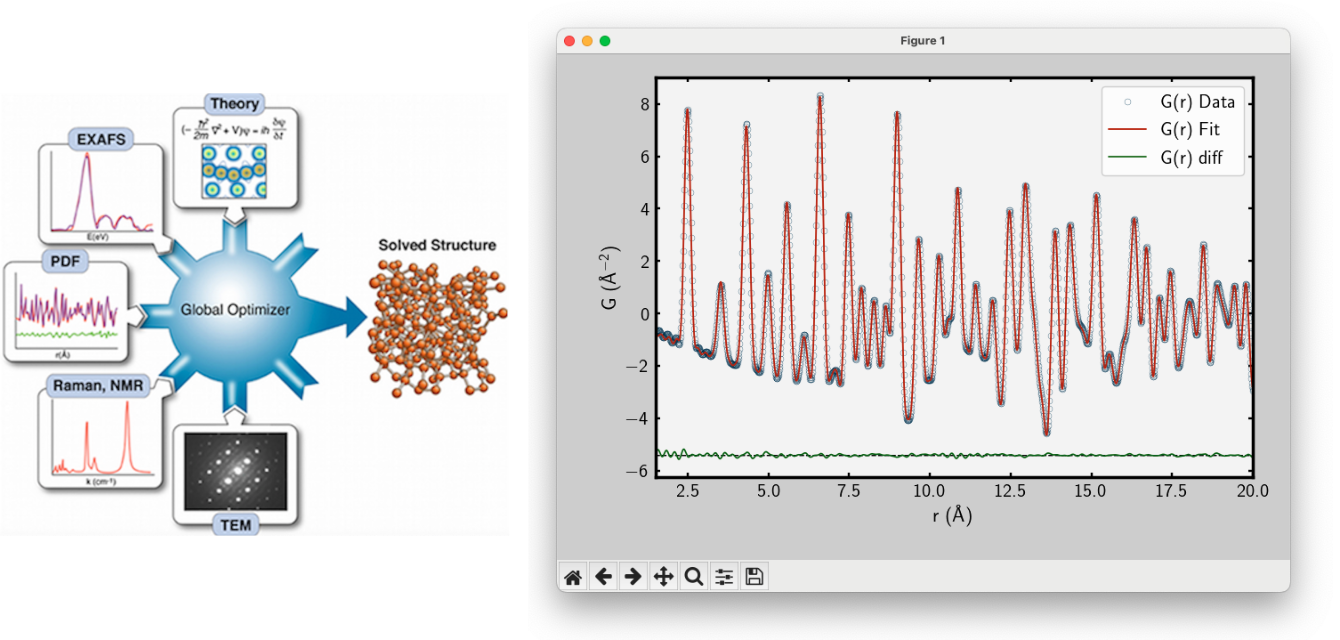
diffpy.cmi is designed as an extensible complex modeling infrastructure.
Users and developers can readily integrate novel data types and constraints into custom workflows.
While widely used for advanced analysis of structural data, the framework is general and can be applied to any problem where
model parameters are refined to fit data.
diffpy.cmi is a community-driven project that supports Unix, Linux, macOS, and Windows platforms.
It is designed to be used in Python scripts enabling flexible scripting and automation for advanced and reproducible workflows.
Users are encouraged to leverage the software for their modeling needs and to contribute feedback,
use cases, and extensions through the project community.
To make diffpy.cmi easy to use, we organize functionality into Packs and Profiles,
allowing users to contribute their own modules and workflows seamlessly.
What’s a Pack?
In short, a pack is a collection of Python packages that work together to accomplish a specific modeling task within the diffpy.cmi framework.
All packs rely on the pack called core, which provides the essential building blocks for creating and running regression workflows.
For example, the pdf pack is designed to handle pair distribution function (PDF) modeling and analysis. It is comprised of two additional Python packages,
diffpy.srreal and pyobjcryst.
Why Packs?
diffpy.cmi is designed to be a centeralized place for all regression tasks. If a user wants to use diffpy.cmi for one specific regression task
and not another, they can do so without having to install unnecessary packages. This design limits version conflicts between packages
that may arise if all packages were bundled together.
Overall, having a modular way to add new functionality is essential in keeping the codebase maintainable and user-friendly!
How to contribute a Pack
Have you built a new workflow you’d like to implement into diffpy.cmi?
We would love to highlight it here!
To share your work with the community, we ask you to follow these simple steps:
Open an Issue: Navigate to the
diffpy.cmiissues page on GitHub and click New Issue. Select the “New Pack Proposal” template. Fill out the template with the name of your pack and open the issue.
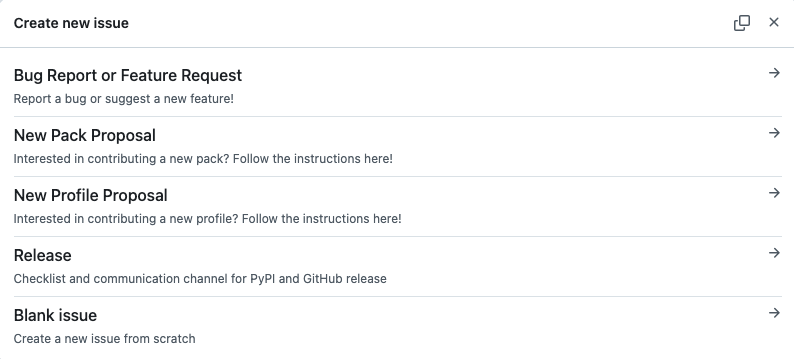
Create a Pull Request: Address all prompts in the issue thread and check all boxes. Once everything is complete and the pack is ready to be added to
diffpy.cmi, create a pull request (PR) linking to the issue. The PR will be reviewed by the maintainers and merged once approved.Be recognized: Make sure to add your pack to the list of available packs in the documentation! Community contributions and new use cases will be showcased and credited here.
What’s a Profile?
A profile is a pre-configured compilation of packs and packages for a specific data type or analysis task within the diffpy.cmi framework.
Profiles are designed to be easily installable configurations that bundle multiple packs and any additional dependencies
required for a particular modeling task.
For example, the profile pdf-plus contains the plotting and pdf packs.
Additionally, it contains the package ipykernel to enable Jupyter Notebook support.
Why Profiles?
Profiles are useful because they allow users to quickly set up and run modeling workflows without needing to configure each component individually.
Running a simple command cmi install <profile_name> will install all necessary packs and dependencies for that profile.
How to contribute a Profile
Have you built a profile that you’d like to share with the community? We would love to highlight it here! To share your work with the community, we ask you to follow these simple steps:
Open an Issue: Navigate to the
diffpy.cmiissues page on GitHub and click New Issue. Select the “New Profile Proposal” template. Fill out the template with the name of your profile and open the issue.
Create a Pull Request: Address all prompts in the issue thread and check all boxes. Once everything is complete and the profile is ready to be added to
diffpy.cmi, create a pull request (PR) linking to the issue. The PR will be reviewed by the maintainers and merged once approved.Be recognized: Make sure to add your profile to the list of available profiles in the documentation! Community contributions and new use cases will be showcased and credited here.